Friday, January 25, 2013
HF Antenna: All Band Doublet
Another thing that I did over the Dec/Jan holidays was finally get an HF antenna back on the air, hanging from the south outrigger on my combination TV / Ham tower. I use a long rope to pull it up into position so that I can maintain it without climbing.
It is very simple, essentially a 40 meter band dipole antenna (roughly 33 feet per side) fed with 300 ohm twinlead. This is commonly referred to as a doublet. At the bottom of the tower, the 300 ohm twinlead is connected to an LDG 4:1 balun, then 50 ohm RG-8X coax runs into the shack and is connected to a LDG AT-11 Antenna Tuner, then a NCG 2050 HF wattmeter and to my Yaesu 857D transceiver.
If you want a picture of what that looks like, check this out.
This is pretty much the simplest possible all band antenna you can make. It is only resonant at 40 meters, but the antenna tuner will "transform" the non 50 ohm impedance to the 50 ohm impedance required by the transceiver.
Some hams will argue that the antenna tuner is not perfect, and creates losses, which is absolutely correct (for more info see this reference). However, it is very handy from an operational perspective that you can use one simple antenna to work many HF bands.
My setup will actually tune and work from 80 meters to 10 meters. One ham commented on the air that you have to be careful using an 80 M dipole on 40 M, as that that creates high impedance, high voltage nodes at the center insulator. I find that it works for me at 100 W without any apparent issues. The transmission line is a random length, and is obviously transforming the impedance into something that the wide range LDG tuner can handle.
That is what I find so interesting about AC frequencies, especially at RF.... they act SO different than DC.
Have worked a number of contacts on 80M and 40M, and they are giving me good signal reports. Of course without another antenna to switch over and compare it to, "good" is pretty relative. When it gets warmer again I want to solder on some more wire to extend it to be a 80 M dipole and see how that works. I have tress to hold the ends pretty much as a flat top.
Also, I may putting in some switching arrangement so I can feed it as a "T" against my UFER ground (and maybe a couple of radials along the edged of the house at ground level) on 160 M. All you do here is tie the 2 halves of the 300 ohm twinlead together at the bottom and feed that with the center of the coax. The shield of the coax goes to ground (preferably lots of ground level or elevated radials, from what I have read).
You can read more about my UFER ground here.
Eric Pierce VA3EP - See the Disclaimer in the Introduction
© Eric Pierce and "VA3EP Amateur Radio And Other Geek Pursuits", 1952-2099. Unauthorized use and/or duplication of this material without express and written permission from this blog’s author and/or owner is strictly prohibited. Excerpts and links may be used, provided that full and clear credit is given to Eric Pierce and "VA3EP Amateur Radio And Other Geek Pursuits", with appropriate and specific direction to the original content.

Thursday, January 17, 2013
Hardware: Storing Resistors and Capacitors
Well, sure have not posted much lately. Had a very busy holiday with family and friends, and did not get in much hacking time.
One thing that I DID do was organize my resistors and capacitors. To do this, I labeled a 24 (actually 25, with one not used) parts drawer with the standard 5% values (one set for resistors, one for non electrolytic capacitors): 10 11 12 13 15 16 18 20 22 24 27 30 33 36 39 43 47 51 56 62 68 75 82 91.
Then I sorted all the parts into the associated bins. They go into the bin by 2 digits of the value, multiplier ignored. Otherwise you would need 1240 drawers! Then when you need a 1K resistor you dig into the 10 drawer and all you have to so is look for the last band to tell it from 10, 100, 10K, etc.
In some cases I had too many of some values, so more than 5 of each value went into labeled freezer bags in a shoe box. Much better than digging around in a HUGE box of resistors with nothing sorted.
For Electrolytic capacitors, label 24 drawers: 1.0 10 100 1000 1.5 15 150 1500 2.2 22 220 2200 3.3 33 330 3300 4.7 47 470 4700 6.8 68 680 6800. You can do this as Electrolytic has wider (usually 20%) tolerance.
Next stop, the semiconductors.
Eric Pierce VA3EP - See the Disclaimer in the Introduction
© Eric Pierce and "VA3EP Amateur Radio And Other Geek Pursuits", 1952-2099. Unauthorized use and/or duplication of this material without express and written permission from this blog’s author and/or owner is strictly prohibited. Excerpts and links may be used, provided that full and clear credit is given to Eric Pierce and "VA3EP Amateur Radio And Other Geek Pursuits", with appropriate and specific direction to the original content.
Wednesday, December 26, 2012
Raspberry Pi: Manager For iOS and Mac
A correspondent sent me this, I have not tried it but it looks interesting, especially to iOS and Mac users.
Look for the "Raspberry Pi Manager" and "Arduino Manager" links on the home page for both the iPhone/iPad and the Mac.
There are a few demo videos, too.
https://sites.google.com/site/lurvill/
Eric Pierce VA3EP - See the Disclaimer in the Introduction
© Eric Pierce and "VA3EP Amateur Radio And Other Geek Pursuits", 1952-2099. Unauthorized use and/or duplication of this material without express and written permission from this blog’s author and/or owner is strictly prohibited. Excerpts and links may be used, provided that full and clear credit is given to Eric Pierce and "VA3EP Amateur Radio And Other Geek Pursuits", with appropriate and specific direction to the original content.
Wednesday, November 28, 2012
Ham Shack: Getting my new one organized
Sorry I have not been too active on rPI and other geek pursuits. I have been reading the rPI news on this, hope to catch up soon.
By the way, if you have not set up a "google news alert" for the rPI (or anything else you like to follow) I recommend you do it. Will mail you a nice summary of the top news on the net from everywhere once a day (or whatever). Very easy, see http://www.google.ca/alerts
Now that the major work is done on my basement finishing project, have been doing outside winterization work around the house. Spent the last 2 weeks cleaning out the garage (had not really done a total cleanout for 7 years :-) and a MAJOR dump run is coming up next Sat.
I did get everything settled in the into the new shack (aka geek pit), see pictures at the top.
I have an FM rig hooked up and checked into the club Bay Bridge Net last week.
Now I am sorting out the shack walk in closet with 3 wrap around shelves that is JAMMED with stuff I have been collecting for years. My wife VA3JOC and I made a rule (she is doing the same for her office closet) that anything that we can't name a specific planned use for, we have to toss. Very liberating (but sometimes painful!)
Eric Pierce VA3EP - See the Disclaimer in the Introduction
© Eric Pierce and "VA3EP Amateur Radio And Other Geek Pursuits", 1952-2099. Unauthorized use and/or duplication of this material without express and written permission from this blog’s author and/or owner is strictly prohibited. Excerpts and links may be used, provided that full and clear credit is given to Eric Pierce and "VA3EP Amateur Radio And Other Geek Pursuits", with appropriate and specific direction to the original content.
Wednesday, October 31, 2012
Software: Windows 8 works for me (so far)
I upgraded 2 home computers to Win 8 on the weekend.
One was my "main" homer laptop, and the other was my wife Jo's (VA3JOC) daughter's (she was visiting on the weekend). The interesting thing is that when she saw mine, she thought it looked "very cool" and just had to have it. I spend a few minutes showing her how to use it, and she loved it.
I did not find ANYTHING that I could not do (but note I have not tried a lot of ham sw yet). A couple of things I had to do a quick google for, but no problem. The new interface takes a few minutes to get used to, but I like it. The integration of old and new UI is a little weired, but that seems to be the only way that they could provide and environment to run old apps (all I have tried so far do). The switching back and forth is clean, and both old and new apps can be active at a time.
The online install and keep your data option worked fine for me (but I did have a data backup just in case :-)
IMHO bottom line is that kids/teens/young adults are going to love it (especially on a tablet), as will any "geeks" that love change. People who do not adapt well to change (i.e. don't like it when there cutlery is on the wrong side of the plate) will hate it.
If you bought (or buy) a new computer between June 2, 2012 and January 31, 2013 you can upgrade online for $14.99 US at
http://windows.microsoft.com/en-CA/windows/upgrade-offer
If you have an older computer you can upgrade for $39.99 US (for now) at
http://windows.microsoft.com/en-US/windows/buy
p.s. have not been too active here later, but my basement finishing project is now 99% complete (just like they say in SW projects :-) All the furniture is in place in all the rooms, stuff stored away in closets and shelves (but needs some re-organizing). Just have to put up the projector in screen in the "home theater", install some taps and do some caulking in the bathroom. I am now starting to get the new shack sorted out and everything hooked back up. Should be back to some serious hamming and hacking soon!
Eric Pierce VA3EP - See the Disclaimer in the Introduction
© Eric Pierce and "VA3EP Amateur Radio And Other Geek Pursuits", 1952-2099. Unauthorized use and/or duplication of this material without express and written permission from this blog’s author and/or owner is strictly prohibited. Excerpts and links may be used, provided that full and clear credit is given to Eric Pierce and "VA3EP Amateur Radio And Other Geek Pursuits", with appropriate and specific direction to the original content.
One was my "main" homer laptop, and the other was my wife Jo's (VA3JOC) daughter's (she was visiting on the weekend). The interesting thing is that when she saw mine, she thought it looked "very cool" and just had to have it. I spend a few minutes showing her how to use it, and she loved it.
I did not find ANYTHING that I could not do (but note I have not tried a lot of ham sw yet). A couple of things I had to do a quick google for, but no problem. The new interface takes a few minutes to get used to, but I like it. The integration of old and new UI is a little weired, but that seems to be the only way that they could provide and environment to run old apps (all I have tried so far do). The switching back and forth is clean, and both old and new apps can be active at a time.
The online install and keep your data option worked fine for me (but I did have a data backup just in case :-)
IMHO bottom line is that kids/teens/young adults are going to love it (especially on a tablet), as will any "geeks" that love change. People who do not adapt well to change (i.e. don't like it when there cutlery is on the wrong side of the plate) will hate it.
If you bought (or buy) a new computer between June 2, 2012 and January 31, 2013 you can upgrade online for $14.99 US at
http://windows.microsoft.com/en-CA/windows/upgrade-offer
If you have an older computer you can upgrade for $39.99 US (for now) at
http://windows.microsoft.com/en-US/windows/buy
p.s. have not been too active here later, but my basement finishing project is now 99% complete (just like they say in SW projects :-) All the furniture is in place in all the rooms, stuff stored away in closets and shelves (but needs some re-organizing). Just have to put up the projector in screen in the "home theater", install some taps and do some caulking in the bathroom. I am now starting to get the new shack sorted out and everything hooked back up. Should be back to some serious hamming and hacking soon!
Eric Pierce VA3EP - See the Disclaimer in the Introduction
© Eric Pierce and "VA3EP Amateur Radio And Other Geek Pursuits", 1952-2099. Unauthorized use and/or duplication of this material without express and written permission from this blog’s author and/or owner is strictly prohibited. Excerpts and links may be used, provided that full and clear credit is given to Eric Pierce and "VA3EP Amateur Radio And Other Geek Pursuits", with appropriate and specific direction to the original content.
Saturday, October 6, 2012
Raspberry Pi - GPIO buffer and Webserver Questions
Doug emailed me with some questions:
> These days, embedded control generally means a web page for monitoring and controlling the device.
Well, IMHO the rPI makes this VERY easy, see
http://ve3epp.blogspot.ca/2012/08/raspberry-pi-display-time-on-rpi-web.html
> Need a small board that has a header that plugs directly into the rPi header
Check out this:
http://adafruit.com/products/914
This was mentioned in
http://ve3epp.blogspot.ca/2012/08/raspberry-pi-home-brew-breadboard.html
> ... buffers for the GPIO lines -- not sure how to address direction.
IMHO Easiest to dedicate lines for out and in. Take a look at this:
http://ve3epp.blogspot.ca/2012/08/raspberry-pi-safely-interfacing-to-gpio.html (first part)
http://ve3epp.blogspot.ca/2012/08/raspberry-pi-why-74hc14n.html
I bought 10 74HC14N off eBay from a cdn supplier for $0.50 each. Looks like he still has some:
http://www.ebay.ca/itm/Lot-2-74HC14N-Hex-Inverter-Schmitt-Trigger-Inputs-7414-QTY-2-/110787294662?pt=LH_DefaultDomain_2&hash=item19cb6ff5c6
> I am thinking seriously of included a dedicated Rs232 interface -- I am a
> big fan of using RS232 for automation interfaciing ( it is reasonable
> robust, and you can always go debugging without a lot of special equipment
Yes, I like good old RS232. If you don't need the full +/-12 volt swing, you can just do a 3.3 to 5 v ttl conversion. See above. Also see:
http://ve3epp.blogspot.ca/2012/08/raspberry-pi-more-about-serial-33v-ttl.html
> I am also interested in 1-wire interface.
Have not done much with this yet, but a lot of people have, see here
You may get the idea that reading some of my old blog posts MAY be useful :-)
Eric Pierce VA3EP - See the Disclaimer in the Introduction
© Eric Pierce and "VA3EP Amateur Radio And Other Geek Pursuits", 1952-2099. Unauthorized use and/or duplication of this material without express and written permission from this blog’s author and/or owner is strictly prohibited. Excerpts and links may be used, provided that full and clear credit is given to Eric Pierce and "VA3EP Amateur Radio And Other Geek Pursuits", with appropriate and specific direction to the original content.
> These days, embedded control generally means a web page for monitoring and controlling the device.
Well, IMHO the rPI makes this VERY easy, see
http://ve3epp.blogspot.ca/2012/08/raspberry-pi-display-time-on-rpi-web.html
> Need a small board that has a header that plugs directly into the rPi header
Check out this:
http://adafruit.com/products/914
This was mentioned in
http://ve3epp.blogspot.ca/2012/08/raspberry-pi-home-brew-breadboard.html
> ... buffers for the GPIO lines -- not sure how to address direction.
IMHO Easiest to dedicate lines for out and in. Take a look at this:
http://ve3epp.blogspot.ca/2012/08/raspberry-pi-safely-interfacing-to-gpio.html (first part)
http://ve3epp.blogspot.ca/2012/08/raspberry-pi-why-74hc14n.html
I bought 10 74HC14N off eBay from a cdn supplier for $0.50 each. Looks like he still has some:
http://www.ebay.ca/itm/Lot-2-74HC14N-Hex-Inverter-Schmitt-Trigger-Inputs-7414-QTY-2-/110787294662?pt=LH_DefaultDomain_2&hash=item19cb6ff5c6
> I am thinking seriously of included a dedicated Rs232 interface -- I am a
> big fan of using RS232 for automation interfaciing ( it is reasonable
> robust, and you can always go debugging without a lot of special equipment
Yes, I like good old RS232. If you don't need the full +/-12 volt swing, you can just do a 3.3 to 5 v ttl conversion. See above. Also see:
http://ve3epp.blogspot.ca/2012/08/raspberry-pi-more-about-serial-33v-ttl.html
> I am also interested in 1-wire interface.
Have not done much with this yet, but a lot of people have, see here
You may get the idea that reading some of my old blog posts MAY be useful :-)
Eric Pierce VA3EP - See the Disclaimer in the Introduction
© Eric Pierce and "VA3EP Amateur Radio And Other Geek Pursuits", 1952-2099. Unauthorized use and/or duplication of this material without express and written permission from this blog’s author and/or owner is strictly prohibited. Excerpts and links may be used, provided that full and clear credit is given to Eric Pierce and "VA3EP Amateur Radio And Other Geek Pursuits", with appropriate and specific direction to the original content.
Monday, September 24, 2012
Raspbery PI - Presentation to Amateur Radio Clubs
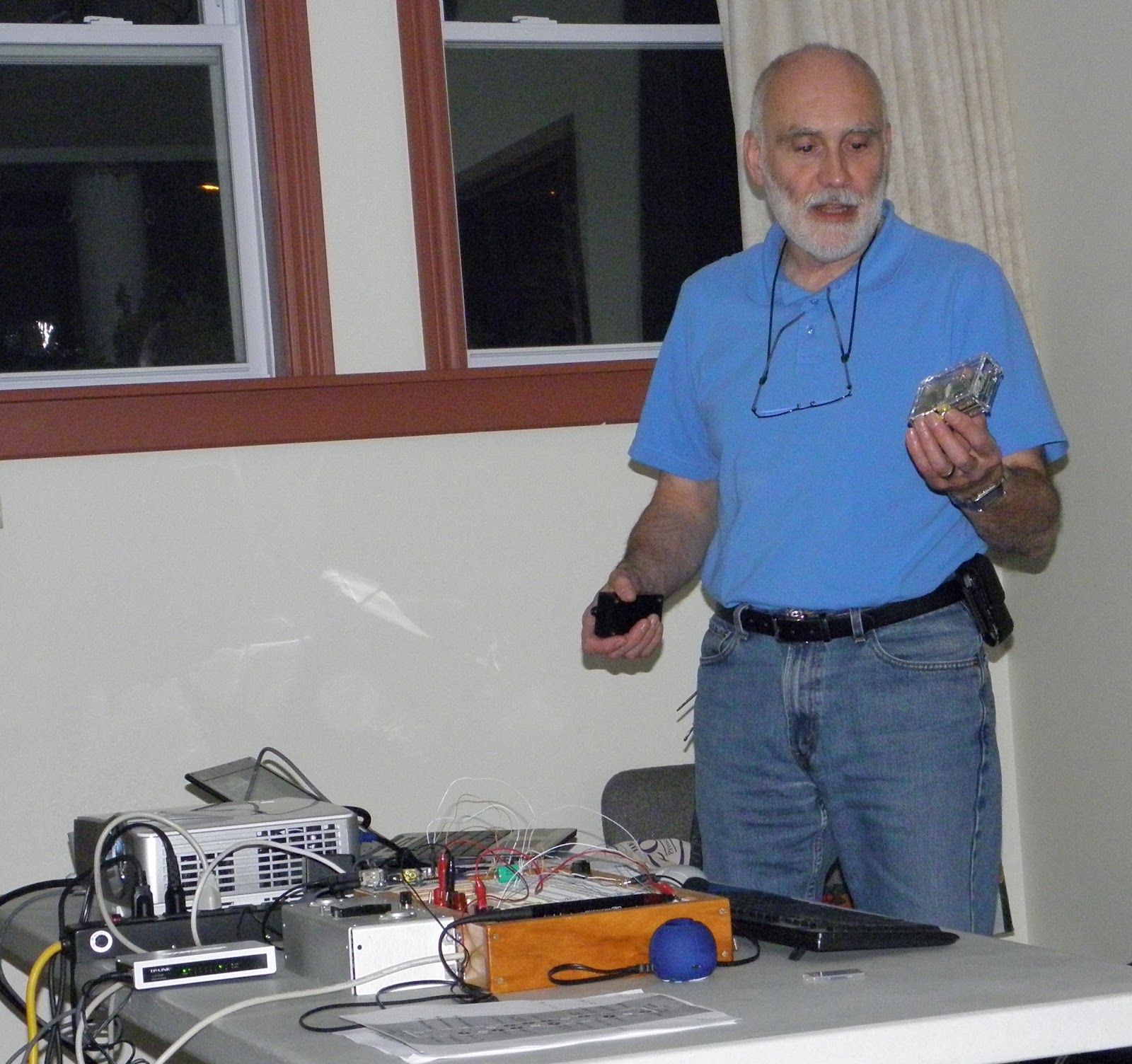
On Wednesday May 15, 2013 I presented an updated version of the Raspberry Pi presentation to the Quinte Amateur Radio Club (QARC). You can view or download a PDF of the presentation from here.
You can buy one over the counter from Qkits in Kingston, or mail order from Element 14 (make sure you select country Canada, it then ships customs cleared).
To get started, see here for the hardware and sw setup, and here for more details on the OS. The official Raspberry PI site, wiki, forum are the place to start as things are moving fast, and information gets out of date fast.
I also have a number of blog posts on things I have done with it (some of which may actually be outdated, as new and better ways to do things are emerging all the time)
A number of the PERC and QARC members have purchased rPIs and we have started a SIG mailing list. Contact me at va3ep@rac.ca if you want to be on the list.
On Wednesday October 4, 2012 I repeated this presentation at the meeting of the Kingston Amateur Radio Club where there was also a lot of interest.
On Thursday September 20, 2012 I made a presentation and demonstration of the Raspberry PI to the Prince Edward Amateur Radio Club.
Eric Pierce VA3EP - See the Disclaimer in the Introduction
© Eric Pierce and "VA3EP Amateur Radio And Other Geek Pursuits", 1952-2099. Unauthorized use and/or duplication of this material without express and written permission from this blog’s author and/or owner is strictly prohibited. Excerpts and links may be used, provided that full and clear credit is given to Eric Pierce and "VA3EP Amateur Radio And Other Geek Pursuits", with appropriate and specific direction to the original content.
Subscribe to:
Posts (Atom)